
PVH Insider+26.5.0 - App Store
You'll be able to see results in few seconds.
Publisher Description

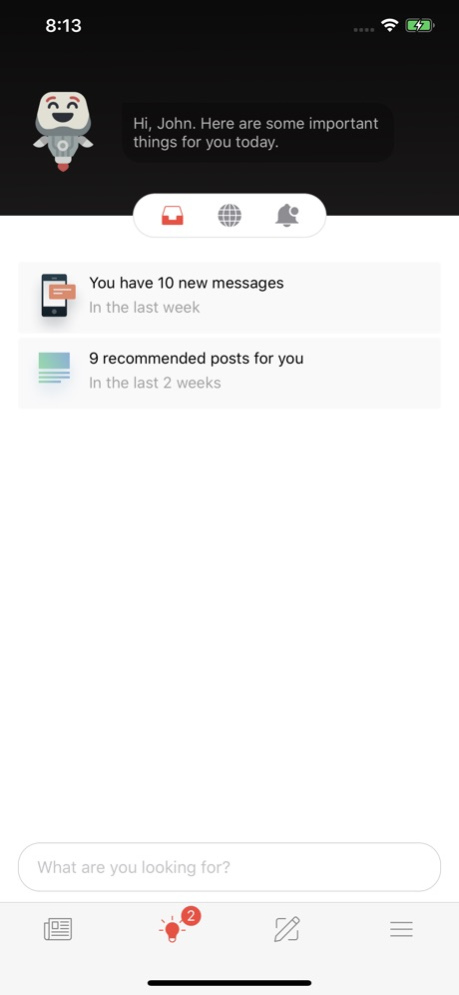


PVH Insider+ is your front door to access all the latest company news and resources to keep you in the know.
Curate your newsfeed by selecting the topics you want to follow, making it easier to find the information you want anytime. Stay informed and connect to colleagues by posting photos, videos, notes, and more.
Accessible through this app, whether working from one of our offices, stores, or distribution centers - access Insider+ anytime.
Become an Insider today!
Version History • Added new content creation capabilities for supported programs
• Improved media uploads, attachments, and publishing experiences
• Enhanced submission workflows for greater reliability
• Added the ability to personalize the order of homepage shortcuts while keeping organization-pinned shortcuts prioritized
• Enhanced the notification experience
• Improved overall performance and resolved bugs 26.5.0 Sep 15 Enhancements
• Ability to mandatory auto follow
• Updated AI experience with a refreshed icon and improvements to overall functionality, now available for select customers
• Added support for Custom Homepage landing experience capability
Organizations can now configure a personalized homepage experience aligned to specific user audiences.
Fixes & Improvements
• General performance improvements and stability enhancements
• Minor bug fixes to improve overall user experience 26.3.3 May 14 * Expanded Reaction Options – Express yourself with a wider range of reactions.
* General Bug Fixes – Performance improvements and minor bug fixes for a smoother experience. 26.1.0 08/08/2025 Minor improvements for a better experience. 5.4.5 05/21/2025 * Notification Center
* Journeys
* General Bug Fixes 5.4.1 02/19/2025 Emergency Bug Fix 5.3.3 11/26/2024 General Bug Fixes 5.3.0 09/06/2024 General Bug Fixes 5.2.4 06/21/2024 General Bug Fixes 5.2.2 06/21/2024 General Bug Fixes 5.0.2 02/01/2024 General Bug Fixes 4.7.1 02/02/2023 General Bug Fixes 4.5.1 06/02/2022 General Bug Fixes 4.1.0 04/01/2021 New Navigation:
We reworked the navigation for simplicity and consistency. We made the features users need every day more prominent and made finding what matters more intuitive.
More prominent search on the top navigation bar
Assistant with all its new features in the bottom navigation.
Expanded “More” menu gives users easier access to channels, resources, profile and more.
Album Posts:
With Albums posts users can upload multiple images at once, creating more engaging image posts.
Publishing:
All users now have more control about their post with added settings
Admin user and channel contributors can create, edit and publish their on the go.
Assistant:
Assistant is every user's personalized connection to the company.
The smart inbox intelligently highlights what content and actions are most important
The command center allows users to find specific content, resources or take action on a task.
Assistant has the ability to integrate to your most common corporate systems.
Polls:
With polls administrators can get instant, targeted employee feedback.
Users can see polls targeted to them and respond in an instant
Poll results are visible after submission as well as once the poll has expired.
General bug fixes and improvements. 4.0.1 07/10/2020 3.9.1. is focused on Assistant, giving companies the ability to integrate with different technology systems to streamline access and make employees more productive with all resources in one place.
View links, resources and important news in assistant
Target assistant configurations to different audiences
Easier way to remove a pre-populated email address from login
Thai language localization support
iOS only: Bluetooth Keyboard Support
General bug fixes and improvements. 3.9.1 03/11/2020 3.7 is focused on empowering more people in the organization to be communicators.
Richer metrics for post authors (reach, clicks, comments, likes) available in the card drawer.
Only the author of a post can see the metrics.
Support for “closed”/non-submittable channels (channels open only to people designated as publishers/channel contributors).
Ability for program managers, channel contributors, etc. to publish directly to their channels from mobile, without requiring the normal submission approval process.
An easier-to-navigate channel list in the submission flow, so users can see which channels auto-publish versus which ones require approval. 3.7.2 08/13/2019 • Search for content, people, and channels. The Search icon has taken the place of the Featured tab in the main navigation bar.
• Featured has moved to the Home tab as a feed filter. Home now includes 3 tabs for My Feed, Featured, & Trending.
• Deep-linked push notifications to Articles now take you directly to the full Article body so you can start reading a post right away.
• You can now navigate to another user’s private profile, but you will only be able to see their name & avatar. 3.6.1-3 12/12/2018 • You can now submit video content from the mobile app!
• The content submission flow has been redesigned, so it’s simpler and easier than ever to submit image and link posts.
• The Submit page now provides a handy list of content you’ve submitted, based on status (uploading, pending review, published, archived), as well as some “stats” on how much you’ve posted, and how the community has responded! 3.5.4 09/28/2018 -Enabled bio-metric log-in.
-Enabled enhanced privacy options. 3.4.2 05/19/2018 -Introducing a new Community Menu to improve ease of use. Tap the icon at the top left and this new menu slides out.
-Invite others to the community via invitations, by way of email or other messaging apps you have installed. Send an invitation from the Community menu.
-Performance improvements 3.4.0-1 04/13/2018 A completely redesigned experience to deliver on the promise of feeling more informed, supported and especially connected.
*Be better connected to the community and enjoy a more personal experience through user profiles
*Bookmark content so you can read it later and have easy access to the content you need to quickly reference
*New channel banners make discovering and following relevant channels easier for you
*Improved feed readability via updated card formats
*Performance improvements
*Fixed a number of bugs
We release updates frequently and we’re always looking for ways to make the experience better. 3.3.0 11/17/2017 - Updated log in screen. 3.2.6 09/08/2017 - Updated app icon. 3.2.4 08/22/2017 -Enhanced functionality to better engage users & provide more context in app
-Support for native video
-New image & content card formats for an optimal visual experience
-Additional metadata surfaced via card drawer
-Performance improvements
We release updates frequently and we’re always looking for ways to make the experience better. 3.2.3 08/18/2017 - Enabled deep-linked push notifications. 2.8.4 04/11/2017
About PVH Insider+
The company that develops PVH Insider+ is PVH Corp.. The latest version released by its developer is 26.5.0.
To install PVH Insider+ on your iOS device, just click the green Continue To App button above to start the installation process. The app is listed on our website since 2026-10-14 and was downloaded 0 times. We have already checked if the download link is safe, however for your own protection we recommend that you scan the downloaded app with your antivirus. Your antivirus may detect the PVH Insider+ as malware if the download link is broken.
How to install PVH Insider+ on your iOS device:
- Click on the Continue To App button on our website. This will redirect you to the App Store.
- Once the PVH Insider+ is shown in the iTunes listing of your iOS device, you can start its download and installation. Tap on the GET button to the right of the app to start downloading it.
- If you are not logged-in the iOS appstore app, you'll be prompted for your your Apple ID and/or password.
- After PVH Insider+ is downloaded, you'll see an INSTALL button to the right. Tap on it to start the actual installation of the iOS app.
- Once installation is finished you can tap on the OPEN button to start it. Its icon will also be added to your device home screen.
Program Details
System requirements
Download information
Pricing
Version History
version 26.5.0
posted on 2026-10-14
Version History • Added new content creation capabilities for supported programs
• Improved media uploads, attachments, and publishing experiences
• Enhanced submission workflows for greater reliability
• Added the ability to personalize the order of homepage shortcuts while keeping organization-pinned shortcuts prioritized
• Enhanced the notification experience
• Improved overall performance and resolved bugs 26.5.0 Sep 15 Enhancements
• Ability to mandatory auto follow
• Updated AI experience with a refreshed icon and improvements to overall functionality, now available for select customers
• Added support for Custom Homepage landing experience capability
Organizations can now configure a personalized homepage experience aligned to specific user audiences.
Fixes & Improvements
• General performance improvements and stability enhancements
• Minor bug fixes to improve overall user experience 26.3.3 May 14 * Expanded Reaction Options – Express yourself with a wider range of reactions.
* General Bug Fixes – Performance improvements and minor bug fixes for a smoother experience. 26.1.0 08/08/2025 Minor improvements for a better experience. 5.4.5 05/21/2025 * Notification Center
* Journeys
* General Bug Fixes 5.4.1 02/19/2025 Emergency Bug Fix 5.3.3 11/26/2024 General Bug Fixes 5.3.0 09/06/2024 General Bug Fixes 5.2.4 06/21/2024 General Bug Fixes 5.2.2 06/21/2024 General Bug Fixes 5.0.2 02/01/2024 General Bug Fixes 4.7.1 02/02/2023 General Bug Fixes 4.5.1 06/02/2022 General Bug Fixes 4.1.0 04/01/2021 New Navigation:
We reworked the navigation for simplicity and consistency. We made the features users need every day more prominent and made finding what matters more intuitive.
More prominent search on the top navigation bar
Assistant with all its new features in the bottom navigation.
Expanded “More” menu gives users easier access to channels, resources, profile and more.
Album Posts:
With Albums posts users can upload multiple images at once, creating more engaging image posts.
Publishing:
All users now have more control about their post with added settings
Admin user and channel contributors can create, edit and publish their on the go.
Assistant:
Assistant is every user's personalized connection to the company.
The smart inbox intelligently highlights what content and actions are most important
The command center allows users to find specific content, resources or take action on a task.
Assistant has the ability to integrate to your most common corporate systems.
Polls:
With polls administrators can get instant, targeted employee feedback.
Users can see polls targeted to them and respond in an instant
Poll results are visible after submission as well as once the poll has expired.
General bug fixes and improvements. 4.0.1 07/10/2020 3.9.1. is focused on Assistant, giving companies the ability to integrate with different technology systems to streamline access and make employees more productive with all resources in one place.
View links, resources and important news in assistant
Target assistant configurations to different audiences
Easier way to remove a pre-populated email address from login
Thai language localization support
iOS only: Bluetooth Keyboard Support
General bug fixes and improvements. 3.9.1 03/11/2020 3.7 is focused on empowering more people in the organization to be communicators.
Richer metrics for post authors (reach, clicks, comments, likes) available in the card drawer.
Only the author of a post can see the metrics.
Support for “closed”/non-submittable channels (channels open only to people designated as publishers/channel contributors).
Ability for program managers, channel contributors, etc. to publish directly to their channels from mobile, without requiring the normal submission approval process.
An easier-to-navigate channel list in the submission flow, so users can see which channels auto-publish versus which ones require approval. 3.7.2 08/13/2019 • Search for content, people, and channels. The Search icon has taken the place of the Featured tab in the main navigation bar.
• Featured has moved to the Home tab as a feed filter. Home now includes 3 tabs for My Feed, Featured, & Trending.
• Deep-linked push notifications to Articles now take you directly to the full Article body so you can start reading a post right away.
• You can now navigate to another user’s private profile, but you will only be able to see their name & avatar. 3.6.1-3 12/12/2018 • You can now submit video content from the mobile app!
• The content submission flow has been redesigned, so it’s simpler and easier than ever to submit image and link posts.
• The Submit page now provides a handy list of content you’ve submitted, based on status (uploading, pending review, published, archived), as well as some “stats” on how much you’ve posted, and how the community has responded! 3.5.4 09/28/2018 -Enabled bio-metric log-in.
-Enabled enhanced privacy options. 3.4.2 05/19/2018 -Introducing a new Community Menu to improve ease of use. Tap the icon at the top left and this new menu slides out.
-Invite others to the community via invitations, by way of email or other messaging apps you have installed. Send an invitation from the Community menu.
-Performance improvements 3.4.0-1 04/13/2018 A completely redesigned experience to deliver on the promise of feeling more informed, supported and especially connected.
*Be better connected to the community and enjoy a more personal experience through user profiles
*Bookmark content so you can read it later and have easy access to the content you need to quickly reference
*New channel banners make discovering and following relevant channels easier for you
*Improved feed readability via updated card formats
*Performance improvements
*Fixed a number of bugs
We release updates frequently and we’re always looking for ways to make the experience better. 3.3.0 11/17/2017 - Updated log in screen. 3.2.6 09/08/2017 - Updated app icon. 3.2.4 08/22/2017 -Enhanced functionality to better engage users & provide more context in app
-Support for native video
-New image & content card formats for an optimal visual experience
-Additional metadata surfaced via card drawer
-Performance improvements
We release updates frequently and we’re always looking for ways to make the experience better. 3.2.3 08/18/2017 - Enabled deep-linked push notifications. 2.8.4 04/11/2017
version 26.5.0
posted on 2026-09-18
Version History • Added new content creation capabilities for supported programs
• Improved media uploads, attachments, and publishing experiences
• Enhanced submission workflows for greater reliability
• Added the ability to personalize the order of homepage shortcuts while keeping organization-pinned shortcuts prioritized
• Enhanced the notification experience
• Improved overall performance and resolved bugs 26.5.0 3d ago Enhancements
• Ability to mandatory auto follow
• Updated AI experience with a refreshed icon and improvements to overall functionality, now available for select customers
• Added support for Custom Homepage landing experience capability
Organizations can now configure a personalized homepage experience aligned to specific user audiences.
Fixes & Improvements
• General performance improvements and stability enhancements
• Minor bug fixes to improve overall user experience 26.3.3 May 14 * Expanded Reaction Options – Express yourself with a wider range of reactions.
* General Bug Fixes – Performance improvements and minor bug fixes for a smoother experience. 26.1.0 08/08/2025 Minor improvements for a better experience. 5.4.5 05/21/2025 * Notification Center
* Journeys
* General Bug Fixes 5.4.1 02/19/2025 Emergency Bug Fix 5.3.3 11/26/2024 General Bug Fixes 5.3.0 09/06/2024 General Bug Fixes 5.2.4 06/21/2024 General Bug Fixes 5.2.2 06/21/2024 General Bug Fixes 5.0.2 02/01/2024 General Bug Fixes 4.7.1 02/02/2023 General Bug Fixes 4.5.1 06/02/2022 General Bug Fixes 4.1.0 04/01/2021 New Navigation:
We reworked the navigation for simplicity and consistency. We made the features users need every day more prominent and made finding what matters more intuitive.
More prominent search on the top navigation bar
Assistant with all its new features in the bottom navigation.
Expanded “More” menu gives users easier access to channels, resources, profile and more.
Album Posts:
With Albums posts users can upload multiple images at once, creating more engaging image posts.
Publishing:
All users now have more control about their post with added settings
Admin user and channel contributors can create, edit and publish their on the go.
Assistant:
Assistant is every user's personalized connection to the company.
The smart inbox intelligently highlights what content and actions are most important
The command center allows users to find specific content, resources or take action on a task.
Assistant has the ability to integrate to your most common corporate systems.
Polls:
With polls administrators can get instant, targeted employee feedback.
Users can see polls targeted to them and respond in an instant
Poll results are visible after submission as well as once the poll has expired.
General bug fixes and improvements. 4.0.1 07/10/2020 3.9.1. is focused on Assistant, giving companies the ability to integrate with different technology systems to streamline access and make employees more productive with all resources in one place.
View links, resources and important news in assistant
Target assistant configurations to different audiences
Easier way to remove a pre-populated email address from login
Thai language localization support
iOS only: Bluetooth Keyboard Support
General bug fixes and improvements. 3.9.1 03/11/2020 3.7 is focused on empowering more people in the organization to be communicators.
Richer metrics for post authors (reach, clicks, comments, likes) available in the card drawer.
Only the author of a post can see the metrics.
Support for “closed”/non-submittable channels (channels open only to people designated as publishers/channel contributors).
Ability for program managers, channel contributors, etc. to publish directly to their channels from mobile, without requiring the normal submission approval process.
An easier-to-navigate channel list in the submission flow, so users can see which channels auto-publish versus which ones require approval. 3.7.2 08/13/2019 • Search for content, people, and channels. The Search icon has taken the place of the Featured tab in the main navigation bar.
• Featured has moved to the Home tab as a feed filter. Home now includes 3 tabs for My Feed, Featured, & Trending.
• Deep-linked push notifications to Articles now take you directly to the full Article body so you can start reading a post right away.
• You can now navigate to another user’s private profile, but you will only be able to see their name & avatar. 3.6.1-3 12/12/2018 • You can now submit video content from the mobile app!
• The content submission flow has been redesigned, so it’s simpler and easier than ever to submit image and link posts.
• The Submit page now provides a handy list of content you’ve submitted, based on status (uploading, pending review, published, archived), as well as some “stats” on how much you’ve posted, and how the community has responded! 3.5.4 09/28/2018 -Enabled bio-metric log-in.
-Enabled enhanced privacy options. 3.4.2 05/19/2018 -Introducing a new Community Menu to improve ease of use. Tap the icon at the top left and this new menu slides out.
-Invite others to the community via invitations, by way of email or other messaging apps you have installed. Send an invitation from the Community menu.
-Performance improvements 3.4.0-1 04/13/2018 A completely redesigned experience to deliver on the promise of feeling more informed, supported and especially connected.
*Be better connected to the community and enjoy a more personal experience through user profiles
*Bookmark content so you can read it later and have easy access to the content you need to quickly reference
*New channel banners make discovering and following relevant channels easier for you
*Improved feed readability via updated card formats
*Performance improvements
*Fixed a number of bugs
We release updates frequently and we’re always looking for ways to make the experience better. 3.3.0 11/17/2017 - Updated log in screen. 3.2.6 09/08/2017 - Updated app icon. 3.2.4 08/22/2017 -Enhanced functionality to better engage users & provide more context in app
-Support for native video
-New image & content card formats for an optimal visual experience
-Additional metadata surfaced via card drawer
-Performance improvements
We release updates frequently and we’re always looking for ways to make the experience better. 3.2.3 08/18/2017 - Enabled deep-linked push notifications. 2.8.4 04/11/2017
version 26.3.3
posted on 2026-09-11
Version History Enhancements
• Ability to mandatory auto follow
• Updated AI experience with a refreshed icon and improvements to overall functionality, now available for select customers
• Added support for Custom Homepage landing experience capability
Organizations can now configure a personalized homepage experience aligned to specific user audiences.
Fixes & Improvements
• General performance improvements and stability enhancements
• Minor bug fixes to improve overall user experience 26.3.3 May 14 * Expanded Reaction Options – Express yourself with a wider range of reactions.
* General Bug Fixes – Performance improvements and minor bug fixes for a smoother experience. 26.1.0 08/08/2025 Minor improvements for a better experience. 5.4.5 05/21/2025 * Notification Center
* Journeys
* General Bug Fixes 5.4.1 02/19/2025 Emergency Bug Fix 5.3.3 11/26/2024 General Bug Fixes 5.3.0 09/06/2024 General Bug Fixes 5.2.4 06/21/2024 General Bug Fixes 5.2.2 06/21/2024 General Bug Fixes 5.0.2 02/01/2024 General Bug Fixes 4.7.1 02/02/2023 General Bug Fixes 4.5.1 06/02/2022 General Bug Fixes 4.1.0 04/01/2021 New Navigation:
We reworked the navigation for simplicity and consistency. We made the features users need every day more prominent and made finding what matters more intuitive.
More prominent search on the top navigation bar
Assistant with all its new features in the bottom navigation.
Expanded “More” menu gives users easier access to channels, resources, profile and more.
Album Posts:
With Albums posts users can upload multiple images at once, creating more engaging image posts.
Publishing:
All users now have more control about their post with added settings
Admin user and channel contributors can create, edit and publish their on the go.
Assistant:
Assistant is every user's personalized connection to the company.
The smart inbox intelligently highlights what content and actions are most important
The command center allows users to find specific content, resources or take action on a task.
Assistant has the ability to integrate to your most common corporate systems.
Polls:
With polls administrators can get instant, targeted employee feedback.
Users can see polls targeted to them and respond in an instant
Poll results are visible after submission as well as once the poll has expired.
General bug fixes and improvements. 4.0.1 07/10/2020 3.9.1. is focused on Assistant, giving companies the ability to integrate with different technology systems to streamline access and make employees more productive with all resources in one place.
View links, resources and important news in assistant
Target assistant configurations to different audiences
Easier way to remove a pre-populated email address from login
Thai language localization support
iOS only: Bluetooth Keyboard Support
General bug fixes and improvements. 3.9.1 03/11/2020 3.7 is focused on empowering more people in the organization to be communicators.
Richer metrics for post authors (reach, clicks, comments, likes) available in the card drawer.
Only the author of a post can see the metrics.
Support for “closed”/non-submittable channels (channels open only to people designated as publishers/channel contributors).
Ability for program managers, channel contributors, etc. to publish directly to their channels from mobile, without requiring the normal submission approval process.
An easier-to-navigate channel list in the submission flow, so users can see which channels auto-publish versus which ones require approval. 3.7.2 08/13/2019 • Search for content, people, and channels. The Search icon has taken the place of the Featured tab in the main navigation bar.
• Featured has moved to the Home tab as a feed filter. Home now includes 3 tabs for My Feed, Featured, & Trending.
• Deep-linked push notifications to Articles now take you directly to the full Article body so you can start reading a post right away.
• You can now navigate to another user’s private profile, but you will only be able to see their name & avatar. 3.6.1-3 12/12/2018 • You can now submit video content from the mobile app!
• The content submission flow has been redesigned, so it’s simpler and easier than ever to submit image and link posts.
• The Submit page now provides a handy list of content you’ve submitted, based on status (uploading, pending review, published, archived), as well as some “stats” on how much you’ve posted, and how the community has responded! 3.5.4 09/28/2018 -Enabled bio-metric log-in.
-Enabled enhanced privacy options. 3.4.2 05/19/2018 -Introducing a new Community Menu to improve ease of use. Tap the icon at the top left and this new menu slides out.
-Invite others to the community via invitations, by way of email or other messaging apps you have installed. Send an invitation from the Community menu.
-Performance improvements 3.4.0-1 04/13/2018 A completely redesigned experience to deliver on the promise of feeling more informed, supported and especially connected.
*Be better connected to the community and enjoy a more personal experience through user profiles
*Bookmark content so you can read it later and have easy access to the content you need to quickly reference
*New channel banners make discovering and following relevant channels easier for you
*Improved feed readability via updated card formats
*Performance improvements
*Fixed a number of bugs
We release updates frequently and we’re always looking for ways to make the experience better. 3.3.0 11/17/2017 - Updated log in screen. 3.2.6 09/08/2017 - Updated app icon. 3.2.4 08/22/2017 -Enhanced functionality to better engage users & provide more context in app
-Support for native video
-New image & content card formats for an optimal visual experience
-Additional metadata surfaced via card drawer
-Performance improvements
We release updates frequently and we’re always looking for ways to make the experience better. 3.2.3 08/18/2017 - Enabled deep-linked push notifications. 2.8.4 04/11/2017 - Bug fixes. 2.8.2 03/03/2017
version 26.1.0
posted on 2026-05-08
Version History * Expanded Reaction Options – Express yourself with a wider range of reactions.
* General Bug Fixes – Performance improvements and minor bug fixes for a smoother experience. 26.1.0 08/08/2025 Minor improvements for a better experience. 5.4.5 05/21/2025 * Notification Center
* Journeys
* General Bug Fixes 5.4.1 02/19/2025 Emergency Bug Fix 5.3.3 11/26/2024 General Bug Fixes 5.3.0 09/06/2024 General Bug Fixes 5.2.4 06/21/2024 General Bug Fixes 5.2.2 06/21/2024 General Bug Fixes 5.0.2 02/01/2024 General Bug Fixes 4.7.1 02/02/2023 General Bug Fixes 4.5.1 06/02/2022 General Bug Fixes 4.1.0 04/01/2021 New Navigation:
We reworked the navigation for simplicity and consistency. We made the features users need every day more prominent and made finding what matters more intuitive.
More prominent search on the top navigation bar
Assistant with all its new features in the bottom navigation.
Expanded “More” menu gives users easier access to channels, resources, profile and more.
Album Posts:
With Albums posts users can upload multiple images at once, creating more engaging image posts.
Publishing:
All users now have more control about their post with added settings
Admin user and channel contributors can create, edit and publish their on the go.
Assistant:
Assistant is every user's personalized connection to the company.
The smart inbox intelligently highlights what content and actions are most important
The command center allows users to find specific content, resources or take action on a task.
Assistant has the ability to integrate to your most common corporate systems.
Polls:
With polls administrators can get instant, targeted employee feedback.
Users can see polls targeted to them and respond in an instant
Poll results are visible after submission as well as once the poll has expired.
General bug fixes and improvements. 4.0.1 07/10/2020 3.9.1. is focused on Assistant, giving companies the ability to integrate with different technology systems to streamline access and make employees more productive with all resources in one place.
View links, resources and important news in assistant
Target assistant configurations to different audiences
Easier way to remove a pre-populated email address from login
Thai language localization support
iOS only: Bluetooth Keyboard Support
General bug fixes and improvements. 3.9.1 03/11/2020 3.7 is focused on empowering more people in the organization to be communicators.
Richer metrics for post authors (reach, clicks, comments, likes) available in the card drawer.
Only the author of a post can see the metrics.
Support for “closed”/non-submittable channels (channels open only to people designated as publishers/channel contributors).
Ability for program managers, channel contributors, etc. to publish directly to their channels from mobile, without requiring the normal submission approval process.
An easier-to-navigate channel list in the submission flow, so users can see which channels auto-publish versus which ones require approval. 3.7.2 08/13/2019 • Search for content, people, and channels. The Search icon has taken the place of the Featured tab in the main navigation bar.
• Featured has moved to the Home tab as a feed filter. Home now includes 3 tabs for My Feed, Featured, & Trending.
• Deep-linked push notifications to Articles now take you directly to the full Article body so you can start reading a post right away.
• You can now navigate to another user’s private profile, but you will only be able to see their name & avatar. 3.6.1-3 12/12/2018 • You can now submit video content from the mobile app!
• The content submission flow has been redesigned, so it’s simpler and easier than ever to submit image and link posts.
• The Submit page now provides a handy list of content you’ve submitted, based on status (uploading, pending review, published, archived), as well as some “stats” on how much you’ve posted, and how the community has responded! 3.5.4 09/28/2018 -Enabled bio-metric log-in.
-Enabled enhanced privacy options. 3.4.2 05/19/2018 -Introducing a new Community Menu to improve ease of use. Tap the icon at the top left and this new menu slides out.
-Invite others to the community via invitations, by way of email or other messaging apps you have installed. Send an invitation from the Community menu.
-Performance improvements 3.4.0-1 04/13/2018 A completely redesigned experience to deliver on the promise of feeling more informed, supported and especially connected.
*Be better connected to the community and enjoy a more personal experience through user profiles
*Bookmark content so you can read it later and have easy access to the content you need to quickly reference
*New channel banners make discovering and following relevant channels easier for you
*Improved feed readability via updated card formats
*Performance improvements
*Fixed a number of bugs
We release updates frequently and we’re always looking for ways to make the experience better. 3.3.0 11/17/2017 - Updated log in screen. 3.2.6 09/08/2017 - Updated app icon. 3.2.4 08/22/2017 -Enhanced functionality to better engage users & provide more context in app
-Support for native video
-New image & content card formats for an optimal visual experience
-Additional metadata surfaced via card drawer
-Performance improvements
We release updates frequently and we’re always looking for ways to make the experience better. 3.2.3 08/18/2017 - Enabled deep-linked push notifications. 2.8.4 04/11/2017 - Bug fixes. 2.8.2 03/03/2017 2.8.1 02/06/2017
version 26.1.0
posted on 2025-08-08
* Expanded Reaction Options – Express yourself with a wider range of reactions.
* General Bug Fixes – Performance improvements and minor bug fixes for a smoother experience.
version 26.1.0
posted on 2025-08-08
Aug 8, 2025
Version 26.1.0
* Expanded Reaction Options – Express yourself with a wider range of reactions.
* General Bug Fixes – Performance improvements and minor bug fixes for a smoother experience.
version 5.4.5
posted on 2025-05-21
May 21, 2025
Version 5.4.5
Minor improvements for a better experience.
version 5.4.1
posted on 2025-02-19
Feb 19, 2025
Version 5.4.1
* Notification Center
* Journeys
* General Bug Fixes
version 4.7.1
posted on 2023-02-02
Feb 2, 2023
Version 4.7.1
General Bug Fixes
version 4.5.1
posted on 2022-06-02
Jun 2, 2022 Version 4.5.1
General Bug Fixes
Disclaimer
Official App Store Link
We do not host PVH Insider+ on our servers. We did not scan it for viruses, adware, spyware or other type of malware. This app is hosted by Apple and passed their terms and conditions to be listed there. We recommend caution when installing it.
The App Store link for PVH Insider+ is provided to you by apps112.com without any warranties, representations or guarantees of any kind, so access it at your own risk.
If you have questions regarding this particular app contact the publisher directly. For questions about the functionalities of apps112.com contact us.
